
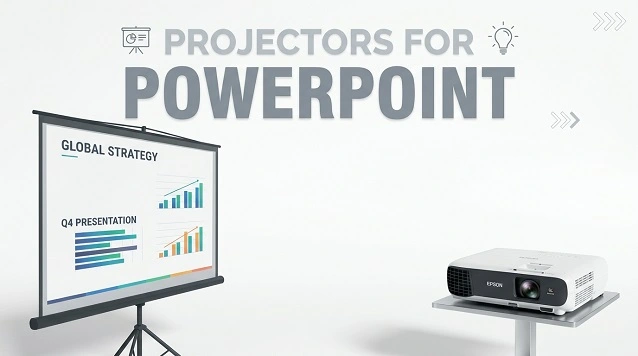
There are many different projectors on the market, so it can be tough to determine which one is best for your specific needs or gaming stuff.
If you’re giving a presentation and need a powerful and versatile projector, then a DLP projector is the best option.
These projectors use Digital Light Processing technology, which results in high-quality images with accurate colors and no pixelation.
Another benefit of DLP projectors is that they are typically smaller and lighter than other projectors, making them easy to transport.
You should consider an LCD projector if you’re looking for a projector specifically designed for PowerPoint presentations.
These projectors offer bright images with excellent color reproduction and are also very quiet. However, they can be a bit more expensive than DLP projectors.
Tips for PowerPoint Presentation Projectors
Lamp Life: The importance of having good lamp life in a projector cannot be overstated.
If a projector’s lamp life is poor, the presenter will likely have to stop and replace the lamp during the presentation, which can be very disruptive.
Brightness: A projector’s brightness matters because it helps project text and images more clearly onto a screen.
If the brightness is low, the text and photos will be difficult to see, making the presentation difficult to follow.
Battery Life: When giving a PowerPoint presentation, it is important to have a projector with good battery life.
This is because if the projector runs out of power in the middle of the presentation, it can be very disruptive for the audience.
Connectivity: When giving a PowerPoint presentation, good connectivity is important to ensure the projector receives power.
If the projector is not receiving power, it will not be able to display the presentation.
Weight: A lightweight projector is easier to move around and set up. This matters for PowerPoint presentations because you want the projector to be easy to move so you can get the best possible projection.
Projectors for PowerPoint Presentations At a Glance:
- ViewSonic PA503S
- Epson VS250
- ViewSonic PLED-W800
- Optoma EH500
- Optoma GT1080HDR
- Epson Home 980
- Epson Pro EX11000
- BenQ TH575
Best Projectors for PowerPoint Presentations Reviews
1. ViewSonic PA503S SVGA Projector
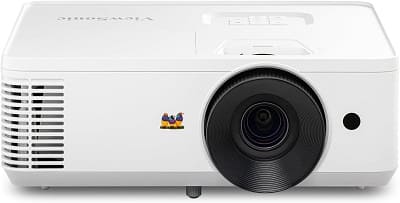
SPECIFICATIONS
- Brightness: 3,600 Lumens
- Native Resolution: 800 × 600 (SVGA)
- Contrast Ratio: 22,000:1
- Connectivity: HDMI, VGA, USB, Serial
- Weight: 5.5 Pounds
The ViewSonic PA503S is a bright, practical projector designed mainly for business presentations, classrooms, and small meeting rooms.
Its 3,600-lumen output provides good visibility in rooms with ambient light, while the 22,000:1 contrast ratio helps maintain decent image quality.
The biggest limitation is its 800 × 600 SVGA resolution. It can accept higher-resolution content, but the native image remains SVGA, so it isn’t the best choice for detailed movies or modern home theater use.
The PA503S offers useful setup features, including 1.1x optical zoom, vertical keystone correction, and a 1.9–2.1 throw ratio. It can project large images and works with laptops, PCs, media players, and other HDMI/VGA devices.
Its 16ms input latency also makes it reasonably responsive for basic video and fast-moving content, although its low native resolution limits its appeal for gaming.
The ViewSonic PA503S is a solid choice for presentations and classrooms, mainly because of its high brightness, reliable connectivity, easy setup, and long lamp life.
Pros
- Bright 3,600-lumen output
- Easy setup
- 1.1x optical zoom
- 16ms input latency
- Good connectivity
Cons
- Not ideal for home theater
2. Epson VS250 Projector
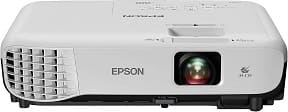
SPECIFICATIONS
- Lamp Life: 10,000 Hours
- Brightness: 3200 Lumens
- Connectivity: HDMI
- Weight: 5.3 Pounds
If you’re looking for a projector that will give your PowerPoint presentations more accurate and vivid colors, even in well-lit rooms, the Epson VS250 is the best affordable option.
This projector boasts 3,200 lumens of equal color and white brightness, making it perfect for medium- to large-sized classrooms or conference rooms.
Plus, the fan noise in ECO mode ensures that distracting background sounds won’t disrupt your presentation.
The Epson VS250 projector is the perfect device for giving presentations. It has an SVGA resolution, which means you can easily project everyday presentations and graphics.
Additionally, the projected distance ranges from 30 to 350 inches so that you can choose the best size for your needs.
The Epson VS250 projector is the Best Affordable Projector for PowerPoint presentations.
Its high resolution and fast, easy operation make it the best affordable projector for PowerPoint presentations.
The VS250’s F-number of 1.44 delivers a bright, clear image, while its 16.7-millimeter focal length provides great versatility for different projection needs.
The digital zoom of 1.0? 1.35 ensures that your presentation will be seen clearly by everyone in the room.
The Epson VS250 projector is the perfect way to enjoy movies, games, and more with stunning image quality.
This projector supports HDMI, the standard in connectivity, for digital video and audio, making it perfect for use with the latest laptops and media players.
The VS250 features an ECO mode that helps conserve energy, making it more environmentally friendly.
Pros
- Bright Display
- Solid Build Quality
- Lightweight
Cons
- Carrying Bag not included
3. ViewSonic PLED-W800
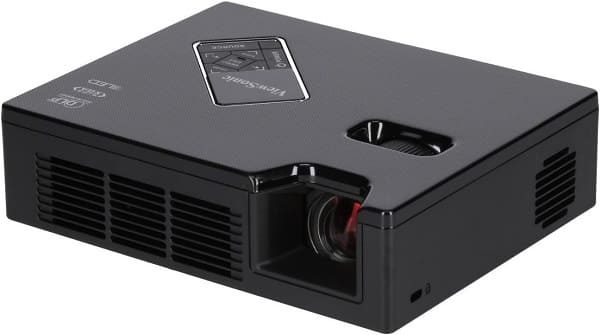
SPECIFICATIONS
- Brightness: 800 ANSI Lumens
- Native Resolution: 1280 × 800 (WXGA)
- Contrast Ratio: 120,000:1
- Connectivity: HDMI/MHL, VGA, Composite, USB, SD Card
- Dimensions: 6.9 × 2.0 × 5.4 Inches
The ViewSonic PLED-W800 is a compact WXGA LED projector designed for portable presentations and small-space entertainment.
Its 800 ANSI-lumen brightness is enough for presentations in rooms with some light, while the 1280 × 800 native resolution provides a sharper image than basic SVGA portable projectors.
The projector has a 1.4:1 throw ratio and can produce images from 24 to 100 inches. Its fixed lens keeps the design compact, while ±40° vertical keystone correction makes setup easier.
Connectivity is one of its stronger points, with HDMI/MHL, VGA, USB, composite video, and an SD card reader.
The built-in media player also allows compatible files to be played directly from USB or SD storage.
For portability, the PLED-W800 weighs roughly 2 pounds, although the external power adapter adds to the total travel weight. It also includes two 2W speakers for basic presentations and multimedia playback.
Overall, the ViewSonic PLED-W800 is a good portable projector for presentations and occasional home entertainment.
Its 800 ANSI lumens, WXGA resolution, extensive connectivity, and 30,000-hour LED life make it a practical travel projector.
However, its brightness is still best suited to controlled lighting rather than bright rooms.
Pros
- 800 ANSI lumens
- WXGA 1280 × 800 resolution
- Compact and lightweight
- Built-in dual speakers
Cons
- No built-in battery
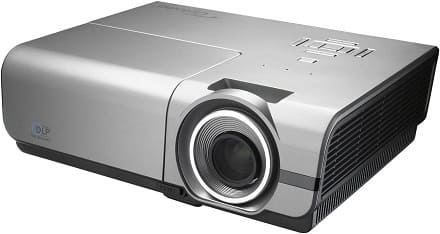
4. Optoma EH500
SPECIFICATIONS
- Native Resolution: 1080p (1920 × 1080)
- Brightness: 4,700 ANSI Lumens
- Contrast Ratio: 10,000:1
- Connectivity: 2× HDMI, 2× VGA, DisplayPort, USB, S-Video, Composite, RJ-45, RS-232
- Throw Ratio: 1.59–1.91:1
- Weight: 8.0 lbs
The Optoma EH500 is a bright 1080p business projector designed for conference rooms, classrooms, and other well-lit spaces.
Its 4,700 ANSI lumens provide strong visibility, while the 10,000:1 contrast ratio helps keep text and graphics sharp.
Its DLP display technology, Full HD resolution, and extensive connectivity make it particularly well suited for PowerPoint presentations and professional presentations.
It also supports Full HD 3D and network management through RJ-45 and Crestron RoomView.
Overall Opinion: The EH500 is a strong choice if brightness and presentation quality are your priorities.
It is relatively large and uses an older lamp-based design, but its high brightness, 1080p resolution, and extensive inputs make it a capable option for business and education environments.
Pros
- Very bright 4,700-lumen output
- Native 1080p resolution
- Extensive connectivity
- Full HD 3D support
- Network control
Cons
- Bulky compared with newer projectors
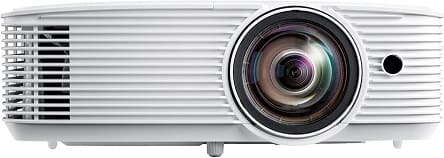
5. Optoma GT1080HDR
SPECIFICATIONS
- Native Resolution: 1080p (1920 × 1080)
- Brightness: 3,800 ANSI Lumens
- Contrast Ratio: 50,000:1
- Throw Ratio: 0.50:1
- Connectivity: 2× HDMI, USB-A, 3.5mm Audio
- Weight: 7.70 lbs
The Optoma GT1080HDR is a short-throw 1080p DLP projector built primarily for gaming and home entertainment.
Its 3,800-lumen brightness, HDR10 support, and 50,000:1 contrast ratio provide a bright and detailed image.
For gaming, the 120Hz refresh rate and low 8.4ms response time make it a strong choice for fast-paced games.
The 0.50:1 short-throw ratio can produce a large image from a relatively short distance, making it useful in smaller rooms.
Overall Opinion: The GT1080HDR is a strong option for gamers and movie watchers who want 1080p resolution, high brightness, HDR10, and short-throw performance.
Its limited connectivity and average built-in audio are the main drawbacks, but the gaming performance makes it a particularly good choice for a dedicated gaming setup.
Pros
- 3,800-lumen brightness
- 1080p Full HD resolution
- HDR10 support
- Short-throw lens
- Long lamp life
Cons
- Limited connectivity
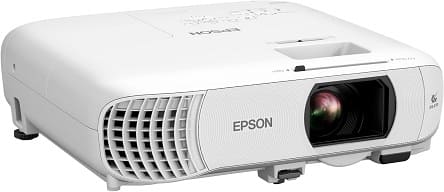
6. Epson Home Cinema 980
SPECIFICATIONS
- Native Resolution: 1080p (1920 × 1080)
- Brightness: 4,000 Lumens
- Contrast Ratio: 16,000:1
- Connectivity: 2× HDMI, USB, VGA, Composite Video
- Screen Size: Up to 300 Inches
- Weight: 6.8 Lbs
The Epson Home Cinema 980 is the Best Video Projector for PowerPoint Presentations for users who need high brightness and sharp Full HD images in classrooms, offices, and meeting rooms.
Its 1080p resolution and 4,000-lumen brightness keep PowerPoint slides, text, charts, and graphics clear and visible, even when there is ambient light in the room.
The 3LCD technology provides bright, detailed images with accurate colors, while the 16,000:1 contrast ratio helps maintain good image depth and clarity.
The Home Cinema 980 also offers practical connectivity, including HDMI, USB, VGA, and composite video, making it easy to connect laptops and other presentation devices.
With support for images up to 300 inches, it can handle everything from smaller classrooms to larger presentation spaces.
The built-in 16W speaker also provides enough audio for basic presentations and video playback.
Overall Opinion: The Epson Home Cinema 980 is a strong choice for PowerPoint presentations thanks to its 4,000-lumen brightness, 1080p resolution, 3LCD technology, and versatile connectivity.
Pros
- 4,000-lumen brightness
- Native 1080p resolution
- Excellent color performance
- Multiple connectivity options
- Large 300-inch image support
Cons
- Heavier than portable projectors
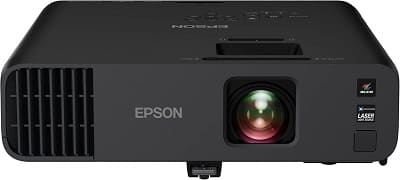
7. Epson Pro EX11000 Full HD 1080p Projector
SPECIFICATIONS
- Light Source: Laser
- Brightness: 4,600 Lumens
- Native Resolution: 1080p (1920 × 1080)
- Contrast Ratio: Up to 2,500,000:1
- Connectivity: 2× HDMI, USB, Ethernet
- Weight: 9.5 Lbs
The Epson Pro EX11000 is a powerful projector for PowerPoint presentations, business meetings, classrooms, and large conference rooms.
Its 4,600-lumen brightness and native 1080p resolution provide sharp text, detailed charts, and bright graphics, even in rooms with significant ambient light.
The 3LCD technology delivers strong color brightness, while the laser light source provides up to 20,000 hours of maintenance-free operation.
For presentations, the EX11000 offers HDMI, USB, Ethernet, Wi-Fi, and Miracast, giving you multiple ways to connect laptops and other devices. Its support for images up to 300 inches also makes it suitable for larger presentation spaces.
Overall Opinion: The Epson Pro EX11000 is an excellent choice for professional presentations where brightness, Full HD resolution, wireless connectivity, and long-term reliability are important.
At 9.5 pounds, it is considerably heavier than the Optoma ML750e, but its much higher brightness and laser light source make it far better suited to large rooms and frequent business use.
Pros
- 4,600-lumen brightness
- Native 1080p resolution
- Excellent color brightness
- Wi-Fi and Miracast
- Multiple connectivity options
Cons
- Larger and less travel-friendly
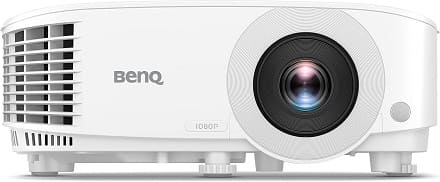
BenQ TH575 1080p Projector
SPECIFICATIONS
- Native Resolution: 1080p (1920 × 1080)
- Brightness: 3,800 ANSI Lumens
- Contrast Ratio: 15,000:1
- Connectivity: 2× HDMI, USB, RS-232, 3.5mm Audio
- Screen Size: 30–300 Inches
- Weight: 5.5 Lbs
The BenQ TH575 is the Best Cheap Projector for PowerPoint Presentations for users who need sharp Full HD images and strong brightness without moving into the premium projector category.
With 3,800 ANSI lumens and native 1080p resolution, it delivers clear text, detailed charts, and bright images, making it well suited for classrooms, offices, and meeting rooms.
Its 15,000:1 contrast ratio helps maintain good image detail, while the DLP display technology provides sharp presentation graphics and accurate colors.
The TH575 also offers two HDMI ports, USB, RS-232, and 3.5mm audio, providing practical connectivity for laptops and presentation equipment. Its 10W built-in speaker is useful for presentations that include video or audio.
With support for screens up to 300 inches, the projector can handle both small classrooms and larger presentation spaces.
Overall Opinion: The BenQ TH575 is a strong budget-friendly PowerPoint projector thanks to its 1080p resolution, 3,800-lumen brightness, useful connectivity, and sharp DLP image quality.
At 5.5 pounds, it is less portable than a mini projector, but the higher brightness and resolution make it much better suited for professional presentations.
Pros
- 3,800 ANSI lumens
- Native 1080p resolution
- Multiple connectivity options
- Up to 15,000-hour lamp life
Cons
- Heavier than compact projectors
- No built-in Wi-Fi
Conclusion
In conclusion, if you are looking for the best projector for PowerPoint presentations, the ViewSonic PA503S is a great option.
It has a high brightness level and short-throw ratio, making it perfect for small to medium-sized rooms.
Plus, it has various features that make it easy to use, including a built-in lens cap and automatic keystone correction.
FAQ
What type of projector do I need for a PowerPoint presentation?
A PowerPoint presentation typically requires a data projector to display the slides on a screen.
Some projectors can also connect to a laptop or computer to show the presentation directly, while others require a separate device to be used to display the slideshow.
It is important to check what type of projector connection your device has before making a purchase.
Which projector is best for presentations?
A variety of projectors on the market can be used for presentations. The most important factor to consider when choosing a projector is the resolution.
A high-resolution projector will provide a clear and sharp image, while a low-resolution projector will be less clear. Other factors to consider include brightness, contrast ratio, and portability.
Which projector is best for office use?
When choosing a projector for office use, there are several factors to consider. The first is brightness – you’ll want a projector that can create a clear and visible image in a bright room.
The next consideration is portability; if you move the projector around often, you’ll want one lightweight and easily transportable.
Can you play a PowerPoint on a projector?
Yes, you can play a PowerPoint presentation on a projector. The projector will display the presentation on a screen for all to see.
To play the presentation, you must connect your computer to the projector using a VGA or HDMI cable.